
HubSpot Marketing Hub Pricing 2026 Tiers Compared for Media Teams
Introduction
Trying to figure out HubSpot Marketing Hub pricing in 2026 can feel like a puzzle that keeps changing. The platform has added a ton of new features over the past year. New AI tools appeared across every tier. Pricing structures shifted. And the line between what you get at the Starter level versus Enterprise keeps moving.
For media companies and publishing teams, this is more than just a budget headache. Your marketing technology directly affects how fast you can publish, how well you track audience behavior, and how much revenue your campaigns actually bring in. Pick the wrong plan and you end up either overpaying for features you never touch or missing tools your competitors already use daily.
Why this year is different
The biggest change in 2026 is how many AI features HubSpot now includes. What used to require separate tools for writing content, predicting customer behavior, and automating campaigns is now built right into the Marketing Hub. According to the latest media industry trends for 2026, companies are moving away from treating AI as one-off experiments and instead weaving it into every part of their workflow. HubSpot is following that same path.
But more features also mean more confusion. Each tier now comes with a different set of AI capabilities, content tools, and usage limits. Comparing them side by side takes real effort. And if you are a media operation managing high content volumes and multiple ad campaigns, choosing the wrong tier can slow down your whole team.
If you are still exploring your options, it helps to see the full picture first. Our guide on digital marketing platforms in 2026 breaks down the major players and how to pick the right fit for your specific needs.
What you will get from this guide
We wrote this to give you a transparent, practical breakdown of HubSpot Marketing Hub pricing. You will learn exactly what each tier costs, which features actually matter for media and publishing teams, and how the total cost adds up once you factor in seats, add-ons, and premium support.
We also look at the best alternatives if HubSpot does not match your budget or workflow. The goal is simple: help you make a confident decision without spending weeks on research.

Keeping up with these rapid changes is hard. That is why we recommend The AI Newsletter Worth Reading. It sends clear daily updates on how AI is reshaping marketing and media so you never miss what matters.
Let us jump into the details.
HubSpot Marketing Hub Pricing Tiers Explained
HubSpot Marketing Hub comes in four tiers. Free, Starter, Professional, and Enterprise.
The Free plan gives you basic tools like a simple CRM and email templates. But most media teams will outgrow it fast because it limits how many contacts you can manage and what automation you can build.
The real decisions start at the paid tiers. And in 2026, the differences between them matter more than ever for publishers and media companies managing content at scale.
Starter: Best for small teams testing the waters
Marketing Hub Starter costs $15 per month per seat with an annual commitment. That first seat comes with 1,000 marketing contacts included. If you need more contacts, additional blocks of 1,000 cost about $50 per month.
Each extra seat costs another $15 per month. So a team of three on Starter would pay $45 per month for seats plus whatever contacts you need.
Starter includes:
- Email marketing with send limits
- Live chat and conversational bots
- Cookie management tools
- Basic list segmentation
What it misses for media teams: advanced automation, custom reporting, and AI-powered content tools. If you run multiple campaigns or need to track audience behavior across channels, you will bump into limits quickly. The Starter tier works best for a new publication testing HubSpot before committing more budget.
Professional: The sweet spot for growing media operations
Marketing Hub Professional starts at $890 per month with an annual commitment. That price includes three core seats and 2,000 marketing contacts.
Additional seats cost about $50 per month each. And if you need more contacts, you buy them in blocks of 5,000 for roughly $250 per month. The one-time onboarding fee lands around $3,000.
This tier changes the game for media companies because it unlocks features that actually move the needle:
- Omni-channel campaign management across email, social, and ads
- Advanced marketing automation with unlimited actions
- Smart content personalization based on visitor behavior
- A/B testing for headlines, CTAs, and landing pages
- AI content assistant for drafting blog posts and social copy
- Custom reporting and analytics
For a media team publishing daily content and running multiple ad campaigns, Professional gives you the social media management tools needed to schedule, track, and optimize everything in one place.
The AI content assistant alone saves hours per week. Instead of writing social captions and email drafts from scratch, your team can generate options in seconds and spend more time on strategy.
Enterprise: Full power for large publishing houses
Marketing Hub Enterprise starts at $3,600 per month with annual billing. That covers five core seats and 10,000 marketing contacts.
Extra seats run around $75 per month each. Additional contacts cost about $100 per month per 10,000 increment. The onboarding fee here jumps to around $7,000.
Enterprise is built for organizations with complex needs. Features exclusive to this tier include:
- Multi-touch revenue attribution to see exactly which campaigns drive ad revenue and subscriptions
- Multi-brand management so different publications under one roof stay separate
- Adaptive testing powered by AI for continuous optimization
- Advanced user permissions and single sign-on for security
- Custom behavioral events and custom objects for deep data tracking
- Team-based data partitioning to control who sees what
If you manage multiple media brands or need to prove ROI to stakeholders across departments, Enterprise justifies its cost. The detailed HubSpot pricing guide for 2026 confirms that organizations with high contact counts and multi-team structures benefit most from this tier.
How contacts affect your total cost
Here is the part that surprises most media buyers. Your monthly bill depends heavily on how many marketing contacts you store.
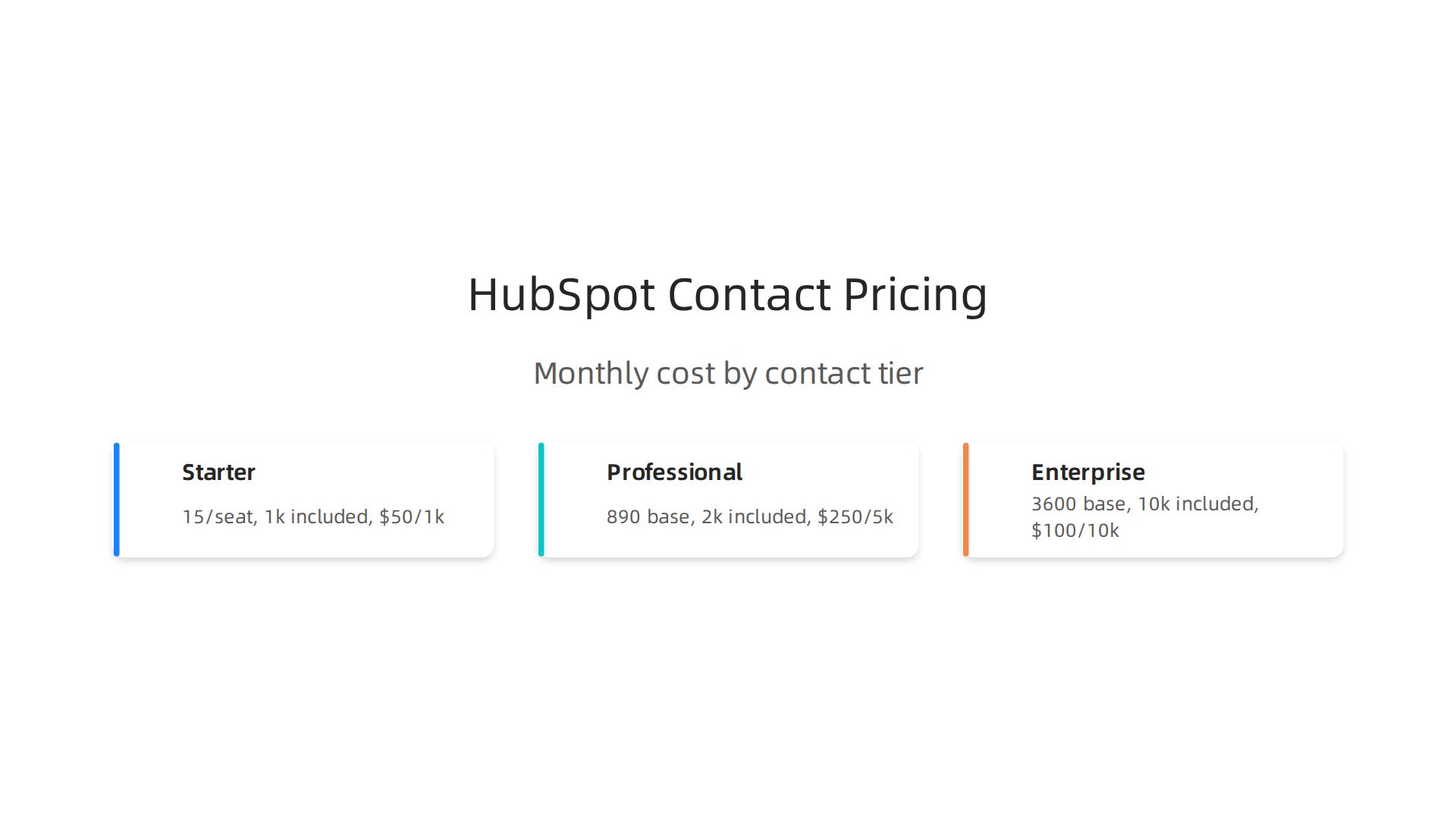
| Tier | Monthly Base | Included Contacts | Cost per Additional Block |
|---|---|---|---|
| Starter | $15/seat | 1,000 | $50 per 1,000 |
| Professional | $890 | 2,000 | $250 per 5,000 |
| Enterprise | $3,600 | 10,000 | $100 per 10,000 |
A media company with 50,000 subscribers on Professional would pay $890 base plus $2,500 for contacts (10 blocks of 5,000 at $250 each). That brings the total to roughly $3,390 per month before adding extra seats or the onboarding fee.
Which tier works for your media team?
Here is a simple way to decide:

- Starter: Fewer than 5 team members, under 5,000 contacts, basic email campaigns only
- Professional: 3 to 10 team members, up to 50,000 contacts, running multi-channel campaigns with automation
- Enterprise: 10+ team members, over 50,000 contacts, managing multiple brands, needing advanced attribution and reporting
Most mid-sized media operations land on Professional for the right balance of capability and cost. The advanced analytics alone help you optimize campaigns faster, which directly improves ad revenue and subscription conversions.
For a full breakdown of how HubSpot compares to other platforms, check out our guide on digital marketing platforms in 2026.
How HubSpot Pricing Compares to Enterprise Marketing Platforms
HubSpot is a strong choice for many media teams. But it is not the only option. Enterprise platforms like Marketo from Adobe, Pardot from Salesforce, and Oracle Eloqua bring different strengths and different price tags.
Understanding where HubSpot fits against these tools helps you make the right call for your media operation.
Marketo (Adobe Marketo Engage)
Marketo is the most common enterprise alternative to HubSpot. It offers powerful automation, AI-driven personalization, and deep analytics. But here is the catch. Adobe does not publish Marketo pricing publicly.
You have to request a custom quote. Based on industry reports, most mid-market teams spend between $1,500 and $6,000+ per month depending on database size and required add-ons. According to a detailed Marketo pricing analysis for 2026, the Growth plan ranges from roughly $1,200 to $2,000+ per month, while the Prime plan ranges from $4,500 to $6,000+ per month.
Compare that to HubSpot Marketing Hub Professional at $890 per month with 2,000 contacts. HubSpot is significantly cheaper at the mid-range. But Marketo gives you more advanced attribution, predictive scoring, and account-based marketing capabilities that large publishing houses sometimes need.
For media teams with over 100,000 contacts, Marketo can actually become more cost-efficient because its pricing scales on database size differently than HubSpot.
Pardot (Salesforce Marketing Cloud)
Pardot is built on top of the Salesforce CRM. If your media company already uses Salesforce for sales or ad operations, Pardot integrates seamlessly. But its pricing starts higher than HubSpot.
Pardot pricing typically begins around $1,250 per month for the Growth plan and goes up from there. The platform is excellent for B2B lead nurturing but less ideal for B2C media companies focused on content distribution and audience engagement.
Oracle Eloqua
Eloqua is the premium choice for large enterprises. Pricing is custom and typically starts well above $2,000 per month. Eloqua excels at complex multi-channel campaigns and advanced segmentation. But it comes with a steep learning curve and requires dedicated admin support.
Most mid-sized media teams find Eloqua too heavy for their needs. It makes more sense for organizations with hundreds of thousands of contacts and dedicated marketing operations teams.
Where HubSpot Wins and Loses
A detailed review comparing Marketo and HubSpot found that HubSpot offers better ease-of-use at a lower price point. That is the key takeaway.
HubSpot wins on:
- Transparent pricing you can calculate online
- User-friendly interface that does not require developer support
- Unified CRM across marketing, sales, and service
- Built-in content marketing and SEO tools
- Fast onboarding with lower setup costs
HubSpot loses on:
- Cost at scale for very large contact databases
- Advanced multi-touch attribution compared to Marketo Enterprise
- Custom reporting flexibility
- API limits for complex integrations
Which One Should Your Media Team Choose?
For most media companies with under 50,000 contacts, HubSpot Professional offers the best balance of features and cost. You get automation, personalization, analytics, and content tools in one platform without hidden fees.
If you need enterprise-level attribution or manage multiple brands with complex segmentation, Marketo or Eloqua may be worth the higher cost. But factor in the longer implementation time and ongoing admin effort.
The right platform depends on your contact volume, technical resources, and budget. HubSpot gives you clarity and control. Enterprise platforms give you power at a price.
As you build out your marketing campaign strategy, the platform you choose will directly affect how fast you can execute and optimize.
The AI Newsletter Worth Reading — Get clear daily AI updates from The Deep View Newsletter.
Top Affordable Alternatives for Media Publishers
HubSpot is a strong choice for many media teams. But not every publisher needs its full feature set or can fit its pricing into a tight budget. The good news is that several affordable alternatives deliver solid automation and CRM features at a fraction of the cost.
These tools work well for mid-size media companies with smaller contact lists. Let’s look at the best options and where each one shines.
ActiveCampaign
ActiveCampaign combines email marketing, automation, and a built-in CRM in one platform.

It is a favorite among small and mid-size media teams because it balances power with price.
Pricing starts low and scales with your contact list. For example, the Starter plan begins at $15 per month, and the Plus plan costs $49 per month for up to 1,000 contacts. Even the Pro plan, which adds split automations and predictive sending, starts at only $79 per month. This makes ActiveCampaign one of the most cost-effective options for growing media companies.
A detailed comparison of top marketing automation software lists ActiveCampaign as a top pick for small business automation. It has a large library of prebuilt workflows that save you time setting up your first campaigns.
Best for: Media publishers who want strong automation and CRM without the high price tag of HubSpot Professional.
Mailchimp
Mailchimp is one of the most well-known email marketing platforms, and for good reason.
It is easy to use, has a free plan for up to 500 contacts, and has evolved into a full marketing automation tool.
Paid plans start at a very low cost, making it an accessible entry point for media teams that are just starting to build their email list. You can send newsletters, create simple automation sequences, and track basic analytics without any technical help.
Mailchimp is often listed among the best digital marketing software options for small businesses and growing teams because of its approachable design and wide range of built-in tools.
Best for: Media publishers who need a simple, affordable starting point for email newsletters and basic automation.
ConvertKit
ConvertKit is built specifically for creators and content-led media businesses. Its focus is on simplicity. You can create visual automation flows, tag subscribers based on their interests, and send targeted broadcasts.
Pricing begins at around $29 per month for up to 1,000 subscribers. As your list grows, the price increases but remains more affordable than HubSpot for smaller databases.
ConvertKit’s strength is its clean interface and focus on helping you build relationships with your audience. It does not have a full CRM or advanced analytics, but for many media publishers, that is enough.
Best for: Creator-driven media companies that prioritize audience engagement over complex enterprise features.
Open-Source Options: Mautic and WordPress + FluentCRM
If you have technical resources on your team, open-source platforms can save you a lot of money. The trade-off is that you need to handle hosting, setup, and maintenance yourself.
Mautic is a free marketing automation platform that gives you email campaigns, lead tracking, and segmentation. It is powerful but requires a developer to install and manage it on your own server.
FluentCRM is a WordPress plugin that turns your WordPress site into a CRM with email marketing and automation. It costs a one-time fee or a small annual subscription, much cheaper than monthly SaaS platforms. If your media site already runs on WordPress, FluentCRM integrates seamlessly.
Best for: Teams with in-house technical skills who want maximum control and minimal monthly costs.
Which Alternative Should You Choose?
Your choice depends on your priorities. If you need strong automation and CRM, go with ActiveCampaign. If you are just starting out and need something free or cheap, Mailchimp is perfect. If you are a content creator building a loyal audience, ConvertKit is worth a look. And if you have a developer on staff, open-source tools like Mautic or FluentCRM can handle your needs at a fraction of the cost.
Each of these alternatives has its own strengths. The key is to match the tool to your team’s size, technical ability, and budget.
To see a wider view of the tools available for media teams, check out our complete guide on the best digital marketing platforms in 2026. It covers everything from CRM to analytics to social media management.
The right platform for you is one that fits your workflow today and can grow with you tomorrow.
The Total Cost of Ownership: HubSpot vs. Open Source Solutions
Monthly subscription prices grab your attention. But they only tell part of the story. To really understand what a tool like HubSpot will cost your media company, you have to look at the total cost of ownership.

What does that mean? It means adding up every single expense over time, not just the sticker price. When you do that, the numbers can surprise you.
The Hidden Costs of HubSpot That Add Up Fast
HubSpot’s Marketing Hub Professional plan starts at around $890 per month. That number is easy to find. What is harder to find are all the extra costs that come with it.
First, there is the mandatory onboarding fee. One detailed breakdown of HubSpot’s total cost of ownership explains that Professional plans require a $3,000 onboarding fee, and Enterprise plans require $6,000. That money goes to HubSpot directly before you even start using the tool.
Then you have data migration. Moving your existing contacts, email history, and automation workflows from an old system into HubSpot can cost thousands more, especially if you hire a partner agency.
Training is another expense. Your team needs to learn the system. That might mean paying for HubSpot Academy courses, hiring a consultant, or spending dozens of hours learning on your own. Those lost hours are a real cost.
Don’t forget API add-ons and additional integrations. If you want to connect HubSpot to your content management system, your analytics tools, or your ad platforms, you may need paid third-party connectors or custom development work.
All these extras mean your first year with HubSpot often costs much more than $890 per month. For many mid-size media companies, the real annual cost hits $36,000 to $50,000 or more. And that is just for Marketing Hub, not counting Sales Hub or Service Hub.
What Open-Source Solutions Really Cost
Open-source tools like Mautic or FluentCRM have no subscription fees. That sounds great. But they come with their own set of costs.
You need hosting. A reliable cloud server to run Mautic costs around $50 to $200 per month depending on your list size. You also need a developer to set it up, maintain it, and fix things when they break. That developer might cost you $5,000 to $15,000 per year if you use a part-time contractor.
Then there is ongoing maintenance. Open-source software does not update itself. You need someone to apply security patches, upgrade versions, and manage the database. That takes time and money.
But here is the thing. Once you set everything up, the monthly cost stays low. You are not paying a per-contact fee that grows with your list. So over three to five years, open source can save a media company tens of thousands of dollars.
The Break-Even Point for Most Media Companies
Many mid-size media companies find that the switch to open source pays for itself within 12 to 18 months. After that, the savings go straight to your bottom line.
For example, if your HubSpot bill is $20,000 per year and your open-source setup costs $8,000 in the first year (hosting plus developer time), you save $12,000 in year one. By year two, you are saving nearly $20,000 annually.
The trade-off is that you need technical skills on your team. If you do not have someone who can manage a server and configure marketing automation, the open-source route can become expensive fast. You might end up paying a developer more than you would pay HubSpot.
Which Approach Wins for You?
The right choice depends on your team’s capabilities and your budget for the long haul.
If you have an in-house developer or a trusted technical partner, open source can free up thousands of dollars each year. That money can go toward content creation, audience growth, or better advertising. For a media company looking to scale without overspending on technology, that is a big advantage.
On the other hand, if your team prefers a managed solution with support and regular updates, HubSpot’s predictable pricing (even with hidden costs) may be worth the premium.
The best way to decide is to calculate your own total cost of ownership for both paths. Compare the full picture, not just the monthly fee.
To help you evaluate your marketing technology stack and find the right fit for your media company, read our full guide on how a digital marketing consultant can accelerate business growth. It covers how to align your tools with your revenue goals.
And if you want to stay ahead of the rapid changes in marketing technology, The AI Newsletter Worth Reading delivers clear daily updates straight to your inbox. It is a smart resource for any media professional navigating the landscape in 2026.
Now that you have a clear picture of the costs, the next question is: What should you actually look for in a marketing hub?

Not all platforms treat media companies the same way. The features you choose will shape your entire marketing technology setup for years.
AI-driven Personalization, Segmentation, and Analytics Are Now Table Stakes
In 2026, basic email blasts and generic landing pages do not cut it. Your audience expects content that feels made for them. That is why AI-driven personalization has become a must-have, not a nice-to-have.
A strong marketing hub uses smart algorithms to show each visitor the right message at the right time. It can recommend articles, suggest products, or trigger emails based on behavior. This kind of personalization keeps people coming back.
Audience segmentation goes hand in hand with that. You need to group your contacts by interests, engagement levels, and purchase history. A good platform makes this easy without requiring a data scientist.
Analytics is the third piece of the puzzle. You need to see which campaigns actually drive results. Real time dashboards and custom reports help your team make quick decisions.
For a deeper look at what these features can do, check out this complete feature breakdown of HubSpot Marketing Hub. It shows how tools like smart content and lead scoring work in practice.
Integration with Advertising Platforms and CRM Matters More Than Ever
Media companies live and die by ad revenue. Your marketing hub needs to talk directly to Google Ads, programmatic platforms, and social ad managers. Without that connection, you waste time moving data by hand.
CRM integration is just as important. When your marketing hub and CRM share data, you can track a reader from their first visit to their subscription. That lets you see the full picture of what works.
Many marketing platforms now offer built-in connectors for popular ad systems. You can also use automation tools like those in the latest marketing automation platforms for agencies to bridge gaps.
Scalability, Data Portability, and Compliance Protect Your Future
As your audience grows, your platform needs to keep up. Look for a hub that handles more contacts, more emails, and more traffic without slowing down or charging huge extra fees.
Data portability means you can take your data with you if you switch tools. Some platforms make it hard to export contacts and history. That can trap you. Choose a hub that gives you easy access to your own data.
Compliance with laws like GDPR and CCPA is nonnegotiable. Your hub should handle consent tracking, data deletion requests, and privacy settings automatically. This protects you from fines and builds trust with your audience.
To see how different platforms stack up on scalability and integration, explore our guide to digital marketing platforms in 2026. It covers what media companies need to know before committing.
Focus on these three areas when you evaluate any marketing hub. They separate the tools that help you grow from the ones that just cost money.
Expert Tips for Negotiating HubSpot Pricing
Once you know which features matter most, you can turn your attention to the price. HubSpot Marketing Hub pricing is not always set in stone. With the right approach, you can often secure a better deal. Here are practical tips that media companies use to lower their costs.
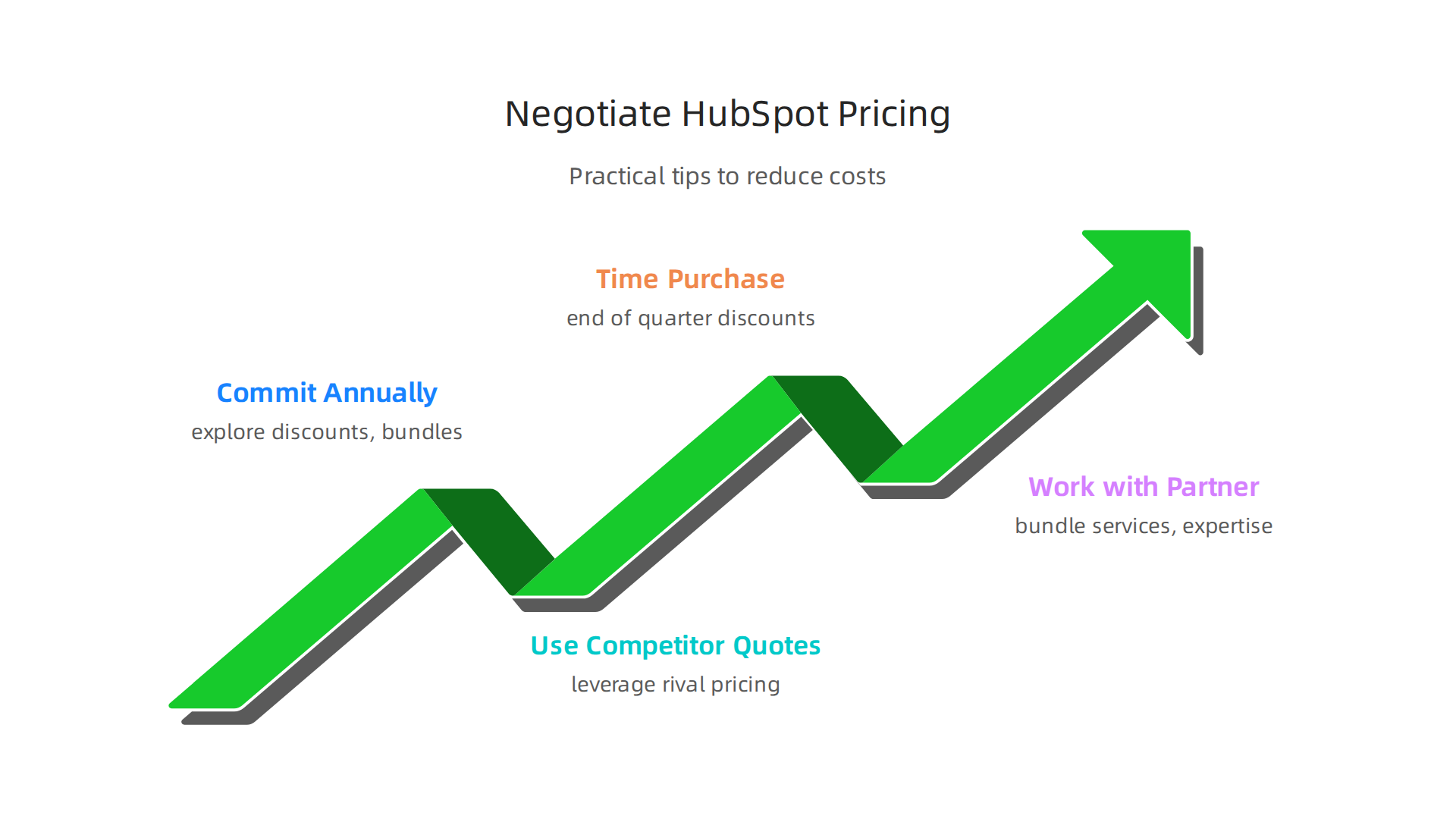
Commit to an annual plan and explore discounts. If you pay for a full year upfront, HubSpot typically offers a significant discount. Monthly billing is convenient, but annual commitment can save you 15 to 20 percent. Nonprofit organizations may qualify for special reduced rates. Also look into bundling Marketing Hub with Sales Hub or CMS Hub. Bundled products often come with a lower combined price than buying each separately.
Use competitor quotes as leverage. HubSpot faces competition from platforms like Marketo, ActiveCampaign, and Mailchimp. Get pricing quotes from these alternatives. When you have a concrete number from a rival, you can bring it to your HubSpot sales rep. They may match or beat that price to win your business. The key is to be polite but firm about your options.
Time your purchase strategically. HubSpot sales teams have quotas tied to the end of each quarter. If you start talks in the last few weeks of March, June, September, or December, you are in a stronger position. Sellers are often more willing to offer extra seats, waived setup fees, or discounted monthly rates to close a deal before the quarter ends.
Work with a HubSpot solutions partner. Authorized partners have inside knowledge of pricing flexibility. They can bundle services like onboarding, training, and custom integrations at a package rate that costs less than buying everything separately. If you need help structuring your negotiation, working with a digital marketing consultant can give you an edge.
A quick look at the official pricing tiers shows the base rates, but the prices you see posted are not always the final offer. For a clear view of the published costs, check the overview of HubSpot Marketing Hub features that outlines the price differences. Use that information as your starting point, not your ceiling.
Negotiating HubSpot Marketing Hub pricing takes a little effort, but the savings can be substantial. A few strategic moves can free up budget for other parts of your marketing technology stack. As you weigh your options, staying informed on industry shifts helps you make smart decisions. Get clear daily AI updates from The Deep View Newsletter to keep your strategy sharp and your timing right.
Summary
This article breaks down HubSpot Marketing Hub pricing in 2026 with a focus on what media and publishing teams need to know to choose wisely. It explains the four tiers (Free, Starter, Professional, Enterprise), exact base prices, how seats and contact blocks add to monthly bills, and which features matter most for publishers—AI content tools, automation, attribution, and multi-brand management. The guide compares HubSpot to enterprise rivals (Marketo, Pardot, Eloqua), outlines lower-cost alternatives (ActiveCampaign, Mailchimp, ConvertKit, open-source options), and walks through total cost of ownership considerations like onboarding, migration, and maintenance. You’ll learn practical rules of thumb for which tier fits your team size and contact counts, how to calculate real annual costs, and negotiation tactics to reduce fees so you can pick a platform that fits both workflow and budget.