
Google Display Ads vs X Ads For Creative and Product Campaigns
Why comparing Google Display ads and X matters for creative and product campaigns
In today’s fast-moving world, businesses often use many different online places to show their ads. This can make things tricky. You might wonder which platform is best for your ads, especially for getting your products seen or sharing creative ads. It’s a big challenge to know where to put your money, how to reach the right people, and if your ads are actually working well.

This is called ad fragmentation, and it means advertisers need to think carefully about their choices.
Many businesses face questions about how to make the best creative ads, how to aim their product advertisements at the right audience, how to check if the ads are doing their job, and if they are getting enough money back for what they spent. This is why it’s so important to compare big ad platforms like Google Display ads and X (which used to be called Twitter). Both platforms offer huge reach, but they work in different ways. For example, Google’s Display Network can reach over 90% of all internet users worldwide across millions of websites and apps in 2026, offering a vast space for your ads [^1]. On the other hand, X ads reach a very engaged audience through its social platform [^2]. What’s interesting is that X has also joined the Google Display Network, which means they can work together in some ways [^3].
This guide will help you understand these two important platforms better. We will look at simple ways to create good ads for both Google Display ads and X ads. We will also show you how to set up product advertisements and explain the best ways to see if your campaigns are truly successful. Understanding how to use different digital marketing platforms in 2026 can really help your business grow.
To stay on top of all the new changes in advertising and technology, especially with AI, it’s helpful to get regular updates.
The AI Newsletter Worth Reading
[^1]: Best Digital Advertising Platforms in 2026: Complete …
[^2]: The 10 Best PPC Ad Networks
[^3]: X (Twitter) partners with Google Ad Manager
Platform differences: reach, inventory types, and buyer flows
When you’re choosing between Google Display ads and X ads, it’s like picking between two very different kinds of stores for your products. Both are huge, but they work in their own ways. Let’s look at how they are different in where your ads show up, what kinds of ads you can use, and how you buy ad space.
Where your ads show up: inventory and placements
Think of "inventory" as all the places your ads can be seen.
-
Google Display Ads: This is a giant network. It lets your ads show on over two million websites, apps, and even videos all across the internet in 2026. This means your product advertisements could appear on a news site, inside a game on a phone, or on a blog you’re reading. It’s like having your ads in almost every shop window in a huge city. These are often called "open web display" ads. They can also be "native placements," which means the ads look more like the regular content on the page, blending in smoothly. Google Display Network aims to reach over 90% of internet users around the world [^1]. This wide reach makes it a key tool for many businesses looking to show their creative ads to a large audience.
-
X Ads: X (formerly Twitter) is a social media platform. So, X ads mostly appear right in people’s timelines, in their feeds, or next to conversations they are following. It’s more like showing your ad inside a busy town square where people are talking and sharing. This is a very different kind of placement. While Google Display ads catch people as they browse various sites, X ads catch them as they actively engage with social content. In 2026, X reaches 586 million users globally [^2]. It offers a direct way to reach people who are talking about topics related to your business.
How you buy ad space: buyer flows and creative choices
The way you buy ads on these platforms also changes how you make your creative ads.
-
Google Display Ads: Most Google Display ads are bought through a system called "programmatic." This means computers use smart rules to buy ad space very quickly, matching your ads to the right people at the right time. Advertisers use special tools called Demand-Side Platforms (DSPs) to do this. Because these ads can appear in so many different places and sizes, the best creative ads for Google Display are often "responsive display ads." These ads can automatically change their size and look to fit any space. This makes it easier to create product advertisements that look good everywhere. On average, the cost per click for display ads is about $0.63, though this can vary [^3].
-
X Ads: Buying X ads is usually more direct. You go right to the X platform to set up your ads. It’s a "platform-first buy," meaning you work within X’s own system. This lets you target people based on what they are talking about, who they follow, and what trends are popular. Because X is all about quick updates and real-time conversations, creative ads for X need to be short, eye-catching, and often tied to what’s happening now. Videos, quick messages, and images that grab attention work best here. X ads can have an average cost per click around $0.74, similar to Google Display, but its strength is in reaching an engaged audience during active conversations [^4].
It’s also worth remembering that X has partnered with the Google Display Network, which means some X ad spaces can be bought through Google’s system too [^5]. This can sometimes make the lines between the two platforms a little blurry, but their main ways of working are still quite different. Understanding these differences helps you decide the best place for your product advertisements and how to design your creative ads for the most impact.

To learn more about how different channels fit into a larger plan, explore how to build your advertising channels in 2026.
[^1]: Best Digital Advertising Platforms in 2026: Complete …
[^2]: Restoration X (Twitter) Ads Stats (2026)
[^3]: Display Advertising Benchmarks 2026: 150+ Data Points
[^4]: Google Ads vs X Ads: Search Intent vs Real-Time Conversation
[^5]: X joins Google Display Network: What marketers need to know
To make sure your advertisements work best on different platforms, you need to know what kinds of creative ads to build. What works for Google Display ads might be different from what works for X ads. Let’s look at the formats, sizes, and what you need to make for each.
Google Display Ads: common creative formats and rules
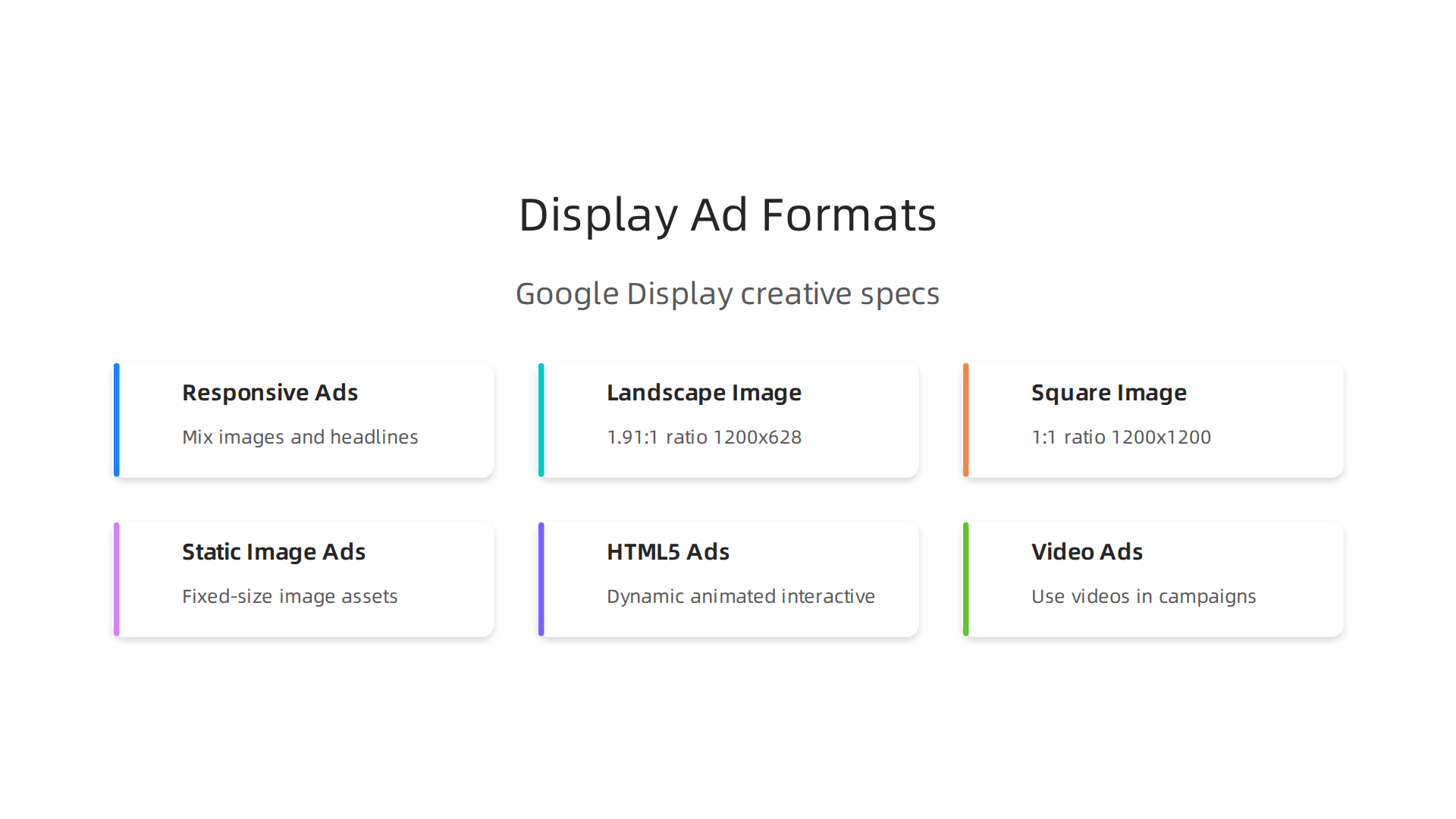
Google Display ads offer a lot of ways to show your product advertisements. The most common kind are called "Responsive Display Ads." These smart ads let you give Google many pieces of your ad, like images, headlines, and descriptions. Then, Google mixes and matches these pieces to fit almost any ad space on the web.
For Responsive Display Ads, you’ll need:
- Images: These are very important. You’ll need both a landscape image (like a wide photo) and a square image.
- Landscape (1.91:1 ratio): The best size is 1200 x 628 pixels, but it needs to be at least 600 x 314 pixels.
- Square (1:1 ratio): The best size is 1200 x 1200 pixels, and it needs to be at least 300 x 300 pixels.
- All images should be JPG or PNG files and be no larger than 5 MB. You can learn more about these creative needs in a complete Google Display Ad Sizes & Specs (2026) guide.
- Logos: You’ll typically need a square logo and a landscape logo.
- Headlines and Descriptions: You’ll provide several short and long headlines, and a few description lines. Google’s system will choose the best ones.
Besides Responsive Display Ads, Google also supports other ad types like:
- Static Image Ads: These are just regular pictures in set sizes, like 300×250 pixels or 728×90 pixels. These fixed-size creative ads are less common now for open web display but still useful in some cases Google Ads Display Dimensions 2026.
- HTML5 Ads: These are more dynamic, meaning they can have animations or be interactive. They are often uploaded as a ZIP file. You can find guidelines for HTML5 display creatives on Google’s support pages.
- Video Ads: You can also use videos as part of your Google Display Network campaigns.
For businesses selling products, Google also uses something called a "product feed." This is like a list of all your products with details like names, prices, and images. Google uses this feed to make special product advertisements that show up for people looking for what you sell. Knowing how to properly set up your Google Shopping Feed Attributes is key for this.
X Ads: engaging with quick messages and visuals
X ads are all about getting attention quickly in people’s social feeds. Your creative ads for X need to be short, sharp, and easy to understand at a glance.
- Images and Videos: These are the main types of ads on X. Images need to be eye-catching. Videos should be short and grab attention right away, often without sound as people scroll through their feeds.
- Text: The written part of your X ad is very important. It needs to be clear and get your message across with few words, sometimes using hashtags or emojis. The goal is to make people stop scrolling and engage.
While there are fewer strict size requirements than for Google Display ads, the focus is always on making content that fits naturally into a social conversation. Think about what makes a good advertisement thrive in a fast-paced environment.
Managing your creative assets
No matter which platform you choose, you’ll need a good way to handle all your creative assets. This means having many versions of your product advertisements ready to go. You might need different sizes, different text, or even different pictures for the same product to see what works best.
It’s also important to keep your brand looking the same across all your ads. This means using the same colors, fonts, and style so people always know it’s your business. Many companies use special tools or teams to create these different versions and make sure everything stays consistent. This helps you scale your advertising efforts without losing your brand’s unique look and feel.
Staying on top of the latest trends in AI and technology is also crucial for creating effective and modern creative ads. You can get clear daily AI updates from The AI Newsletter Worth Reading.
After putting together great creative ads, the next big step is making sure they reach the right people. This means having smart targeting strategies.

What works for product advertisements on one platform might be very different on another. Let’s look at how Google Display Ads and X ads find their audiences.
Google Display Ads: finding your ideal customer
Google Display Ads have many powerful ways to target people. It’s not just about showing your creative ads anywhere. It’s about showing them to people who are most likely to care about your products.
Here are some key ways Google Display Ads target audiences in 2026:
- Affinity Audiences: These are groups of people with strong interests in certain topics. For example, if you sell hiking gear, you can show your ads to people who love outdoor activities. This helps your product advertisements get seen by people who already have a general interest.
- Custom Intent Audiences: This is a more precise way to find people. You can target users who are actively searching for specific products, services, or topics on Google. If someone is typing "best running shoes" into Google Search, you can show them your running shoe ads on other websites later. This is great for businesses selling specific products, especially for B2B companies looking for certain types of software or services, as it combines intent with in-market signals Google Display Ads Best Practices for SaaS in 2026.
- In-Market Audiences: These are people who Google believes are actively looking to buy something right now. Google watches what people search for and the websites they visit. If someone is looking at many reviews for new cars, Google might put them in an "in-market for cars" audience. This is very helpful for product advertisements because it reaches people close to making a purchase.
- Remarketing: This is when you show ads to people who have already visited your website or used your app. If someone looked at a product on your site but didn’t buy it, remarketing can show them that product again later. This is often very effective, as these people already know your brand Google Display Ads Best Practices: Unlocking Campaigns in 2026. You can even divide these groups by how recently they visited or what they looked at, like those who added items to a cart. This helps send the right message to different groups of past visitors.
- Contextual Targeting: This method places your product advertisements on websites or pages that are related to your ad’s content. For example, if your ad is about baking supplies, it might show up on a food blog with recipes. This helps ensure your creative ads appear in a relevant setting.
- Programmatic Match: This advanced method uses technology to automatically buy ad space and show your ads to the right people at the right time. It often uses a mix of the targeting types mentioned above to get the best results.
X Ads: engaging with quick messages and visuals
X ads work differently because they are on a social media platform. The goal is to catch attention as people quickly scroll through their feed. Targeting on X usually focuses on:
- Interest Targeting: Similar to Google’s affinity audiences, you can target users based on topics they follow or talk about on X.
- Engagement Targeting: You can reach people who have interacted with specific tweets, accounts, or hashtags. This is good for finding people who are already engaging with content related to your business.
- Contextual Targeting: On X, this means placing your ads within conversations or alongside content that matches your ad’s theme.
To make an ad thrive in these fast-paced environments, both the creative and the targeting must be spot on. Learn more about what makes a good advertisement thrive.
First-party data vs. contextual targeting: what’s best?
Choosing the right targeting method is crucial for your product advertisements. Two important approaches are using first-party data and contextual targeting.
First-party data is information you collect directly from your customers, like who visits your website, who buys your products, or who signs up for your emails. This data is very valuable because it comes straight from people who have already shown interest in your business. It is often seen as the most powerful way to target, especially for remarketing or finding similar new customers. Using your own customer data is considered your most valuable asset for targeting How to Create Display Ads That Sell in 2026. The main challenge with first-party data is that you need a good amount of it, and it can take time to gather and organize.
Contextual targeting is simpler. It places your creative ads based on the content of the webpage or app. For example, a sports shoe ad on a sports news website. It’s less complex to set up than first-party data targeting. However, its effectiveness can vary. While it ensures your ad is relevant to the page content, it doesn’t guarantee the person viewing the page is interested in buying your product at that moment.
In 2026, many experts suggest that audience-based targeting, especially using your own data or Google’s custom intent audiences, often leads to better results than just relying on contextual placements. While contextual targeting has its place, combining it with smart audience signals can help your google display ads perform much better.
After choosing the best targeting methods, the next big step is how you actually show your products in ads. This is where product ads and feeds come in. They are like the backbone for showing specific items to specific people.
Product ads and feeds: setup, dynamic creatives, and catalog use-cases
To make your product advertisements truly shine, you need a good system for handling all your product details. This system uses something called a product feed. Think of a product feed as a big list or spreadsheet that holds all the important information about every product you sell.
Each row in this "spreadsheet" is one product, and each column describes a different part of that product. For example, a product feed will list things like:
- A unique ID for each product
- The product’s name or title
- A clear description of what the product is
- A direct link to where someone can buy the product on your website
- A link to a picture of the product
- Its current price
- Whether it is in stock or not
These details are very important because platforms like Google use them to create and show your creative ads. You can learn more about all the important pieces of information in a feed from this guide on Google Shopping Feed Attributes: Full List + Tips (2026).
For Google Display Ads and other Google shopping formats, your product feed usually lives in a place called Google Merchant Center. Other platforms, like X (formerly Twitter), also have their own similar catalog systems where you upload your product information.
Dynamic creative ads using feeds
One of the coolest things about product feeds is how they power "dynamic creative" ads. These are ads that change what they show based on what each person might be interested in.
- For finding new customers (prospecting): Dynamic creative ads can show new people product advertisements that are very relevant to them. For example, if someone often visits websites about camping, these ads can show them your camping gear, even if they’ve never been to your store before. The product feed makes sure the right gear, with the right picture and price, appears in the ad.
- For bringing back visitors (remarketing): This is where dynamic ads are super powerful. Imagine someone visited your website, looked at a specific pair of shoes, and even added them to their shopping cart but didn’t buy them. A dynamic creative ad can then show them that exact pair of shoes again later, maybe with a reminder to complete their purchase. This works great for google display ads because it reminds people who were already interested. Google’s Demand Gen campaigns, for example, can use these product feeds to automatically show your items to interested buyers Use a product feed to show your products in Demand Gen.
Having a well-organized and accurate product feed is key for these types of personalized product advertisements. This means:
- Clear Titles: Make sure your product titles are helpful and include important details like the brand, product type, and key features. This helps Google match your products to what people are searching for. You can find more tips on Product Feed Optimization: The Complete Google Merchant.
- Correct Information: All prices, images, and descriptions must match what’s on your website.
- Regular Updates: Keep your feed fresh. If a product goes out of stock or its price changes, your feed needs to reflect that quickly so your ads are always accurate. Making sure your product feed is optimized is crucial for success, and you can get even more insights on how to optimize your Google Shopping feed for growth in 2026.
Platforms like X also use product catalogs to run dynamic product advertisements. They work in a similar way, using your product data to show relevant items to people as they scroll through their feed. Understanding the various options for advertising can help you reach more customers effectively. Explore the Types of Google Ads to broaden your strategy.
Making these ads smart often involves using advanced tools and sometimes even AI to figure out which product to show to whom. Staying updated on new tech can give you an edge.
Get clear daily AI updates from The AI Newsletter Worth Reading.
Once you have your product ads set up and looking great, the next big question is: how do you know if they are actually working? This is where measuring your ad results across different platforms, like Google Display Ads and X ads, becomes super important. It is not always as simple as it sounds, especially when dealing with creative ads that people might just see, not click.
Measurement and cross-platform attribution for display & X campaigns
Measuring how well your ads do across many platforms can be tricky in 2026. Here are some of the main problems:
- View-through attribution: Imagine someone sees your product advertisements, like a Google Display Ad, but does not click on it. Later, they remember your brand and go directly to your website to buy something. Did the ad help? Yes! But traditional tracking might only count clicks. This is called view-through attribution and it means understanding the impact of ads that people saw but did not click right away. It is a big challenge to measure this accurately, as outlined in guides about Cross-platform campaign measurement in 2026.
- Cross-device identity gaps: People use many devices. They might see an X ad on their phone, then browse your site on their tablet, and finally buy on their computer. How do you know all these actions came from the same person and were influenced by your ad? This gap in knowing who is who across devices makes it hard to see the full journey of a customer.
- Incremental lift versus last-click: Many ad systems measure success based on the "last click." This means if someone clicked your Google Display Ad right before buying, the ad gets all the credit. But what if they saw 10 other ads and visited your site three times before that last click? Incremental lift tries to figure out how much extra sales your ad caused that would not have happened otherwise. It paints a much clearer picture of an ad’s true value, something often discussed in resources on Cross-Platform Measurement.
Setting up smart measurement
To get a better handle on how your product advertisements are performing, especially for google display ads and X ads, consider these practical steps:
- Unified tagging: This means using one consistent way to track everything across all your platforms. Instead of having separate trackers for each ad type or platform, a unified system can help you see the whole picture. This method is key for getting a unified view of ad performance.
- Server-side measurement: This is a more advanced way of tracking that happens on your website’s server, not just in the visitor’s browser. It can be more accurate and reliable, especially with new privacy rules that might block some client-side tracking.
- Incrementality tests: These are experiments where you show ads to one group of people (test group) and do not show them to another similar group (control group). By comparing the sales or actions between these groups, you can see if your ads truly made an "incremental" difference. This helps show the real impact of your creative ads. You can learn more about how to set these up in a Cross-Channel Measurement Playbook.
For platforms like X, their own tools help you understand how your X ads are doing. They provide ways to measure website visits and other actions. You can find out more on X’s advertising measurement page.
Using these methods helps you move past simple "last-click" numbers to truly understand your analytic marketing and see the big picture of your campaign success. It is crucial for making smart choices about where to put your ad money.
AI-driven creatives, testing frameworks, and optimization workflows
After understanding how to measure your ads, let’s talk about making them even smarter. In 2026, many businesses are using something called Artificial Intelligence, or AI, to create better product advertisements.

AI helps you make many different creative ads quickly and easily.
AI can help make lots of versions of your ads. It can change the pictures, words, and even the colors very fast. This means you can have many creative ads ready to show. AI can even help make these ads feel more personal for different people. For example, for your Google Display Ads Guide 2026: Strategy, Targeting & Setup, AI can suggest the best words and images to use. This helps make your X ads or future telegram ads more interesting. If you want to stay updated on how AI is changing things, you should definitely check out The AI Newsletter Worth Reading to get clear daily AI updates.
Once you have these AI-made creative ads, you need to test them to see which ones work best. Think of it like a science experiment for your product advertisements.
- Make a guess (Hypothesis): First, you make a smart guess about what might work. For example, you might guess that a creative ad with a happy person will get more clicks than one with just a product.
- Use different versions (Creative Variants): You then create a few different versions of your creative ads. These are called creative variants. For your google display ads, you might have one showing a happy person and another showing only your product.
- Set aside a group (Holdouts): It is also good to have a "holdout" group. These are people who do not see your new product advertisements. This helps you compare and see if your new ad really makes an "extra" difference compared to not showing it at all. This helps you see the true effect of your creative ads.
- Look at your goals (KPIs): Finally, you look at your main goals, called KPIs (Key Performance Indicators). For ads, this might be how many people clicked on your ad, how many bought something, or how much money you made. You compare the results from your different creative ads to see which one worked best. This process helps you understand What Makes a Good Advertisement Thrive: 2026 Strategies for Impact and put your ad money in the right places.
After you make and test your product advertisements to see what works best, there’s another very important step. You need to make sure your creative ads follow all the rules. Every place you show your ads, like Google for your google display ads, X for x ads, or even telegram ads, has its own set of rules. These rules are about what you can say, what pictures you can use, and even who you can show your ads to.
Some general rules stop you from advertising certain things. This includes stuff that might be dangerous, illegal, or just not right for everyone to see. Things like some kinds of alcohol, medicine, or political messages often have very strict rules. Also, how you use people’s information (data) in your ads is a big deal in 2026. You always need to be careful with privacy.
To make sure your ads get approved and run smoothly, here’s a simple checklist:
- Know the Rules: Before you make any creative ads, read the rules for the platform where you want to show them. For example, Google Display Ads have specific rules about what images and text are allowed. You need to make sure your images are the right size, like a landscape image at 1200 x 628 pixels or a square image at 1200 x 1200 pixels, and are not too big in file size, usually up to 5 MB for images Google Ad Specs and Templates: Complete 2026 Guide.
- Check Your Content: Make sure your pictures and words do not break any rules. This includes avoiding things that might upset people or make false claims.
- Set Up Brand Safety: Most ad platforms let you choose where your ads show up. This is called brand safety. You can tell the platform to avoid showing your product advertisements next to content that is not good for your brand. This helps build trust with your audience. You can learn more about making sure your advertising efforts are seen as trustworthy by checking out how to Build a Strong Advertising Ethos for Trust in the AI Era.
- Watch for Updates: The rules can change, especially with new technology like AI. So, it is a good idea to check for updates often.
Following these steps helps make sure your amazing creative ads get seen by the right people, in the right way, without any trouble.
Summary
This article compares Google Display ads and X (formerly Twitter) to help marketers choose the best places to run creative and product campaigns. It explains the key differences in reach, placements, and buying flows — programmatic, responsive assets for Google Display versus platform-first, conversational creative on X — and walks through the formats and technical specs you need to build effective ads. You’ll learn how product feeds power dynamic creatives, when to use first‑party data versus contextual targeting, and why unified measurement and incrementality testing matter for true ROI. The guide also covers asset management, AI-driven creative testing, and compliance/brand safety checks so you can scale campaigns without losing control. After reading, you’ll know how to match creative formats to each platform, set up feeds and targeting, and measure cross‑platform impact to optimize spend and performance.